
Day is the full twenty-four hours, not just your opening hours — so a 7 AM emergency or a 9 PM favor is never invisible. Hours outside your working day are dimmed rather than hidden. Overlapping appointments sit side by side rather than on top of each other.
Week shows three, five or seven days at once on iPad and Mac. Cards show more or less detail depending on how much room there is, so a seven-day view stays readable.
Month: Month shows appointment summaries, capacity indicators, and event markers. Busy dates can show an overflow count; open the date to review the full schedule.
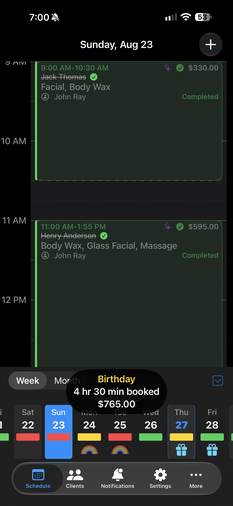
Every date carries a color based on how many minutes are booked:
- 🟢 Green — light
- 🟡 Amber — moderate
- 🔴 Red — heavy
You set both thresholds. Press and hold any day to see hours booked and the day's capacity load without opening it.
If you have an event set, a custom icon shows and the event name will also show within the capacity bubble.
When a time overlaps another appointment or blocked time, you get a warning with real options: move to the next available slot, search up to sixty days ahead within your working hours, change the time — or double-book anyway, which it will record as a deliberate override.
It never refuses a booking. You are the one talking to the client.
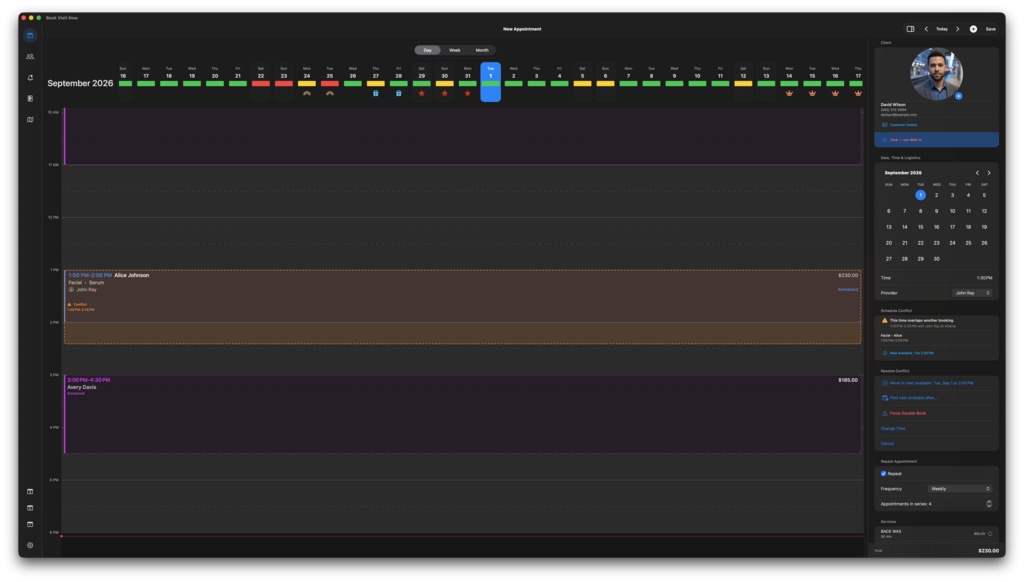
Daily, weekly, fortnightly, monthly, or a custom interval up to a year. Set the number of appointments in the run and the whole series is booked at once.
Full days, part days, a run of days, or a daily lunch break. Add a reason, and choose whether the reason is visible on the calendar; useful when a client might see your screen.
Manage appointments on iPhone, iPad, and Mac. With Calendar permission, Book Visit Now can also save appointment information to Apple Calendar. These events supplement your Book Visit Now schedule; they do not replace its complete appointment history.
Availability on other devices depends on the calendar account and synchronization settings you use.
No online booking — you take appointments yourself.
No payment processing - Use whatever payment processor you like.
Start Free with all features for up to ten active clients.
Every feature, no time limit, no card required. $24.99 a month for unlimited after that: no per-client fee, no forms fee, no texting fee, no commission, no add-ons.